For Windows 10 and 11 · Not on sale yet
You know the answer. · You have never said it out loud. · That is the part they are testing.
Run a mock interview with a friend. AnswerGym listens, and while you answer it tells you what the question was actually probing and one way to say it in the time you would really have. Warm up tonight. Walk in ready.
$169 once, no subscription. You bring your own AI keys. Practice only, not for use during live interviews.
The problem
Preparation is reading. Interviews are speaking.
You have read the system design primer. You know what a dead-letter queue is and you could write one. Then someone asks you about it across a table, and what comes out is four sentences that circle the point and never land on it.
That is not a knowledge gap. It is a rehearsal gap. The first time most candidates say their answer out loud is in the room, to the person deciding.
The usual fix is to practise with a friend. It half works: a friend can ask the question, but they usually cannot tell you why it was asked, or what a strong answer would have had in it that yours did not.
How it works
What it does while you practise
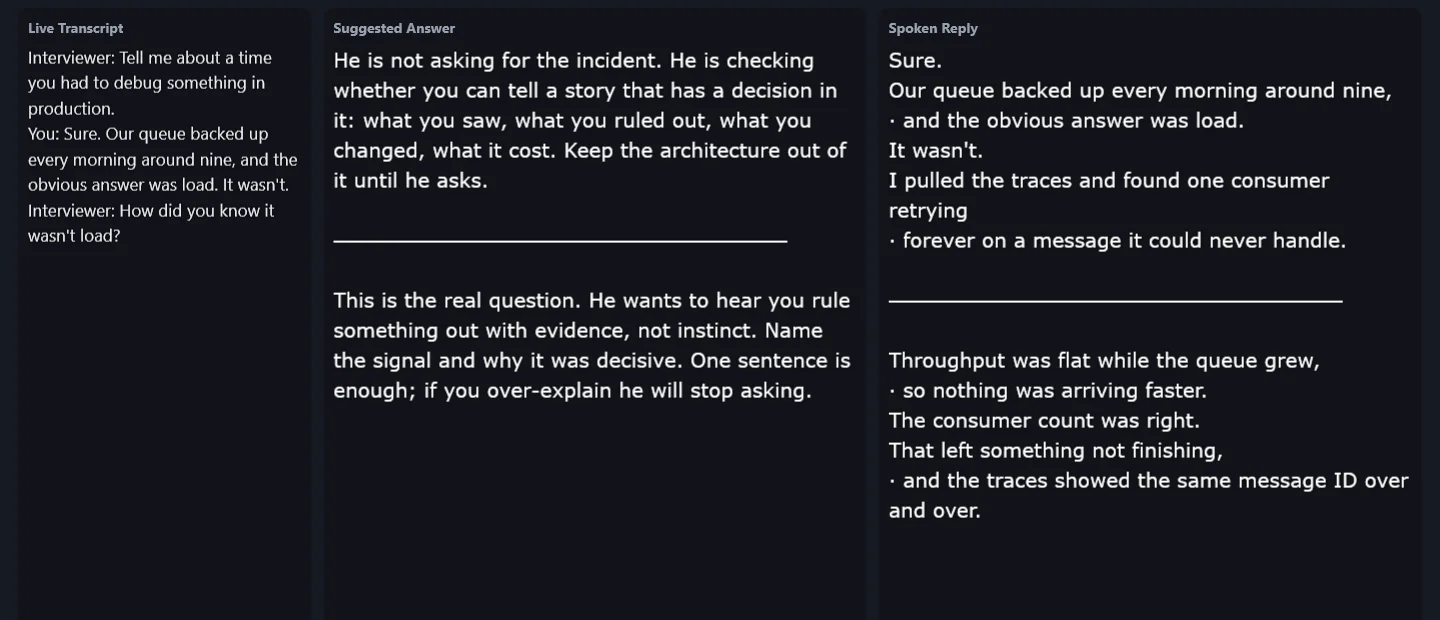
It listens to the round
Your microphone and your computer's audio are captured separately, so your partner's questions and your answers stay apart. It works on a video call or across a table with the phone on speaker.
It tells you what is being probed
Not just an answer. "He is checking whether you can rule something out with evidence rather than instinct. One sentence is enough."
It gives you words to say out loud
First person, contractions, short enough to deliver. One breath to a line, so you read it the way you would say it.
The part a friend cannot give you
Your friend can ask. They cannot tell you why.
- "Say the fix, then say what it cost. Candidates who only give the fix sound like they have never shipped one."
- "This is the real question. He wants evidence, not instinct."
- "Keep the architecture out of it until he asks."
You practise the answer. It tells you what the answer was for.
One purchase, three apps
Three ways to practise
AnswerGym
The full overlay, for a mock round with a partner. Transcript, what is being probed, and the words to say. Ask the same question four ways and see four framings.
AnswerGym Screen
A coding problem on your screen. One hotkey and you get the approach in words: how to open your explanation, what to say before you type, and answers to the follow-ups an interviewer would push next.
AnswerGym Mini
No window at all. Prompts arrive as banners that fade. For the round where the drill is answering without a script in front of you.
They are connected. A problem arrives on screen; you capture it and work through it. Then your partner asks, out loud, "why did you pick that approach?" One setting and the overlay answers from your recent captures. Both apps read one configuration file, so there is nothing to wire up.
Project mode
Talking is the first half. Then someone asks you to write it.
Press Project and the whole conversation so far opens in a window of its own and gets written out properly.
- Thinking aloud. What you say while you work: the approaches you dropped and why, the edge cases you are watching.
- Approach. The data structure or algorithm, and the alternative you rejected.
- Complexity. Time and space, each with a reason rather than a bare big-O.
- Code and how to run it. Complete, runnable, commented where it is not obvious.
It writes while the conversation carries on. A feedback box rewrites against the code that is already there, so "now use less memory" lands on your actual code.
A live coding round is mostly assessed on the narration, and the narration is the thing nobody practises.
Practising alone
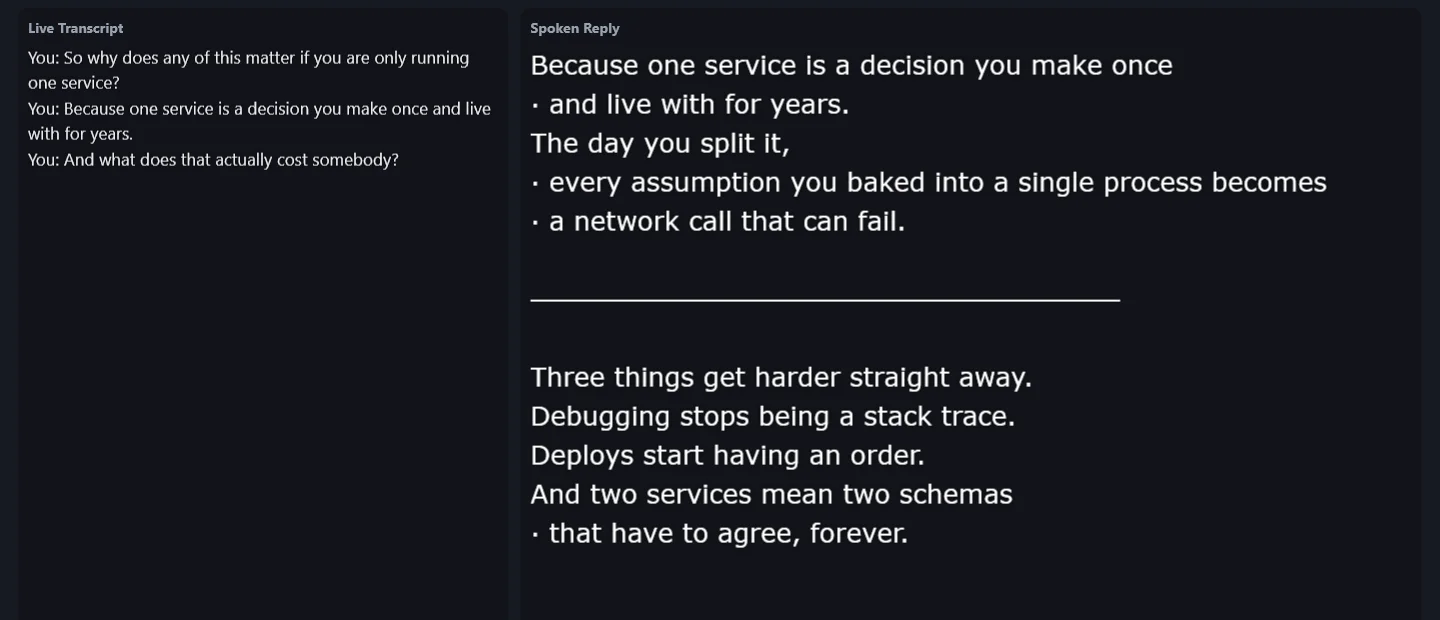
Turn it around and it becomes a teleprompter.
Switch on Answer my side and the loop inverts. You ask the question out loud, and it writes the answer for you to read as your next line.
For rehearsing without a partner, a talking-head video, a course recording or a conference talk.
Languages
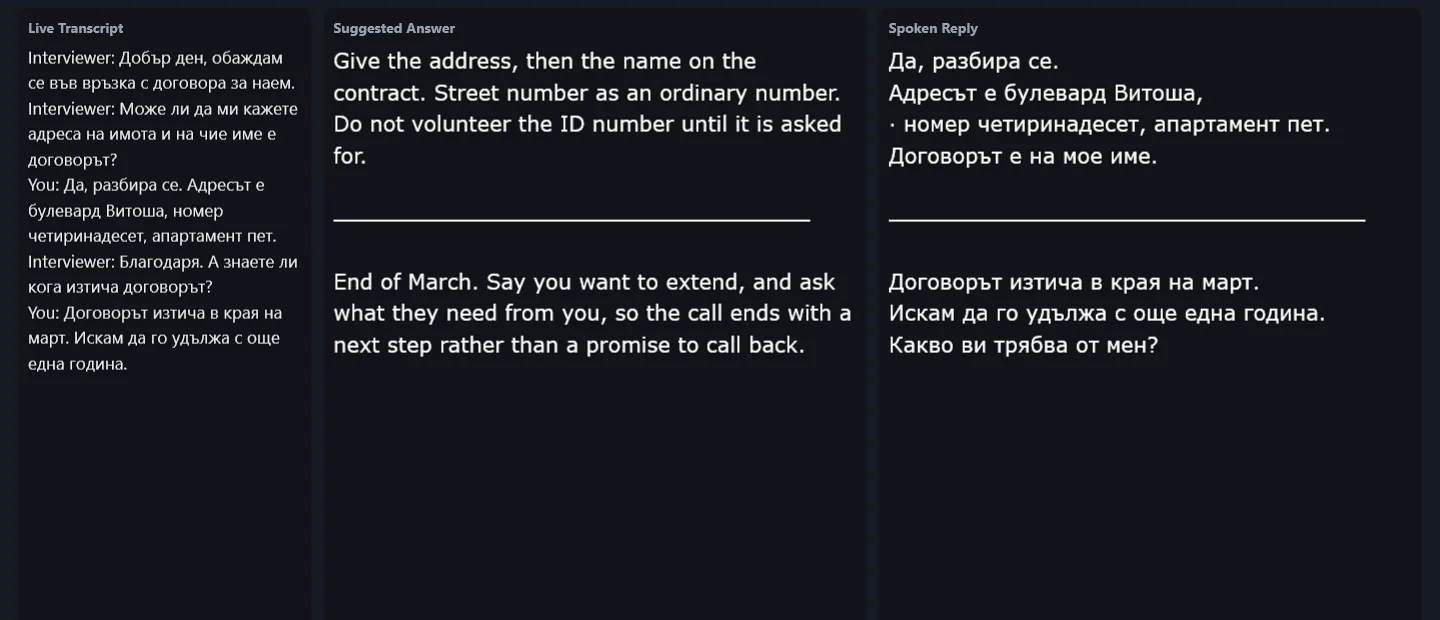
Whatever language you are interviewing in.
English, German, French, Spanish, Bulgarian and Persian in the picker, and any other language code you type in. Read the coaching in the language you think in. Practise the answer in the language you will be interviewed in.
Specifics
What you are getting
| Platform | Windows 10 and 11. One self-contained file per app. No installer, no runtime, no admin rights. |
|---|---|
| Transcription | Deepgram, with your own API key. |
| Answers | Any model on OpenRouter, with your own key. You choose the model per task. |
| Your data | Audio goes to your transcription provider and text to your model provider. There is no AnswerGym server in the middle, no account and no telemetry. |
| Setup | Put a file with your two API keys next to the app. Write a few lines about the round you are practising for: your CV, the job description, the level. |
Pricing
Pay once. No monthly plan.
Not on sale yet. These are the prices it will launch at.
App
$169 once
- All three apps
- Runs on your own AI keys
- Bug fixes for 30 days
- Full refund within 7 days if it does not run as described
App + source code
$299 once
- Everything in App
- The full source code, to use and modify for yourself or your company. No resale.
- One revision from the developer: up to 3 hours of work, requested within 30 days
- No refund once the source is downloaded
You bring: a Deepgram key for transcription and an OpenRouter key for answers.
You pay their usage directly to them. AnswerGym never sees or bills it.
Questions
Before you ask
Is this for use in a real interview?
No. It is built for the hours before one: mock rounds, rehearsal and practice on your own.
Do I need a practice partner?
It is better with one, but no. Alone, switch on Answer my side: ask the question out loud and it answers you. With a partner you get what a partner cannot give you, which is what each question was for.
What will the AI usage cost me?
It depends on how long you practise and which model you pick on OpenRouter. You pay Deepgram and OpenRouter directly, at their prices, and you can see every charge in their dashboards.
How far behind the conversation is it?
Transcription is live, and the answer arrives a word at a time, so you can start reading before it finishes. There is still a pause. It is roughly the pause you should be taking anyway.
What happens when it mishears?
You see the transcript it worked from, so a wrong answer is traceable to a wrong word. One button answers again.
Does it work on Mac or Linux?
No. Windows 10 and 11 only.
Can I try it before buying?
It ships with a demo mode that replays a scripted session into the panes with no microphone, no transcription and no model call. And the app tier has a 7-day full refund if it does not run as described.